PC-Station
Overview
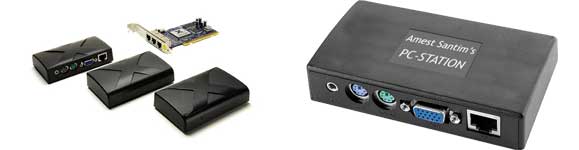
The X Series PCI direct connect access device allows for up to 7 (seven) users to simultaneously share a single PC at a fraction of the cost of a typical PC. Each user enjoys their own virtual workspace complete with their own applications, settings, files and preferences providing each user with a rich PC experience.
Most PC users only use a small fraction—as low as 5%—of the power they have. PC-Station takes the excess capacity and allows additional users to utilize the wasted power.
With a PC-Station solution, each user still has their own monitor, keyboard, mouse and speakers. However, instead of connecting directly to a PC, these peripherals connect to a small PC-Station access terminal on their desk. The access terminals then connect to the host PC, it uses a high-performance software that comes bundled with the devices, free of charge.
PC-Station runs on Windows Xp and Linux (Ubuntu). It features compact design, a stereo jack, and 16-bit video for 800×600 and 1024×768 video modes. The performance of each access terminal is similar to the host PC. The configuration includes one or two PCI cards, each of which has three connectors. PC-Station access devices connect directly to each PCI card via standard cables (up to 9 meters long using Cat 6e network cable).
PC-Station is best used for common PC applications such as Internet browsing, e-mail, office suites, educational software, accounting applications etc. It doesn’t support 3D games, heavy video based applications or CAD applications.
Key Benefits


- Easy to Install – With each kit including PC-Station software, a PCI card and three access devices (terminals), set up is as easy as plugging in the card and installing the software.
- Powerful and Flexible – Software applications run simultaneously and independently on each virtual desktop. The access devices are small, silent and can be mounted on the back of the monitor or on a wall.
- Economical and Efficient – Share one PC with up to 7 users and lower your computer hardware and support costs by up to 70%.
- Green and Clean – Uses only 1 watt of energy per user, and weighs just a few grams.
PC-Station Savings Calculator
Host Computer Requirements
To add one set of PC-Station (three additional users) to a given host, it needs to have at least a Pentium IV processor with 2.8GHz processor and 1 GB of RAM. To add two sets of PC-Station (six additional users) the host computer needs to have a processor speed of at least 3.4GHz and 2 GB of RAM. PC-Station also requires MS Windows Xp to be installed on the host computer. It runs on all versions of Win Xp but works best on Service Pack 3. It can also be used with various version of Linux such as Ubuntu and Debian Linux.
Limitations
The terminals do not have a microphone port and therefore voice requiring applications such as Skype voice chatting are not supported. The lack of a USB port also means you can not plug in individual web cams or other USB devices but you can run USB Extension Cables (see picture) from 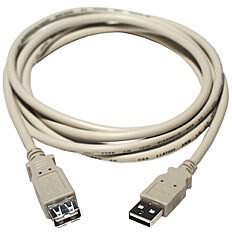 the host computer to the station and use the PC-Station management console to assign specific USB ports on the host for specific terminals to achieve a USB port for every station (terminal) user. The host computer can also be used for such purposes as it has all the necessary ports.
Moreover if USB ports are a requirement, you can choose to use our USB based multi-user device called Multipoint Workstation.
Cabling Guide
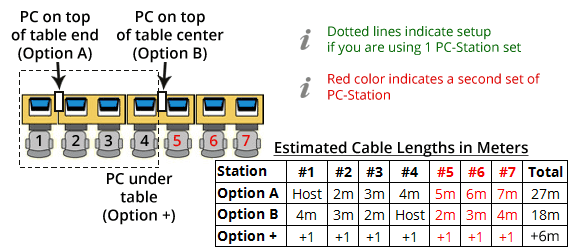
Although PC-Station supports Cat 5e cables (for lengths up to 5 meters) it is advisable to use Cat 6e cables. With Cat 6e cables, you can go up to a maximum length of 10 meters for each cable.
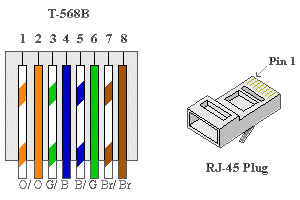 Cables should be terminated to RJ-45 connectors according to the standard method (wires match on both ends of the cables). This is the most common configuration available when purchasing standard patch cables. So called “cross-over” cables (used to directly connect two Ethernet devices without a switch) CANNOT be used.
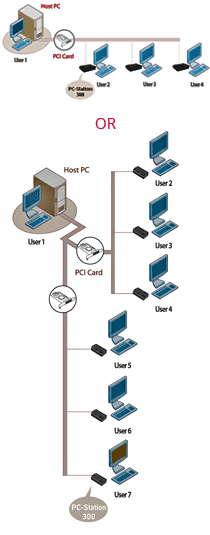
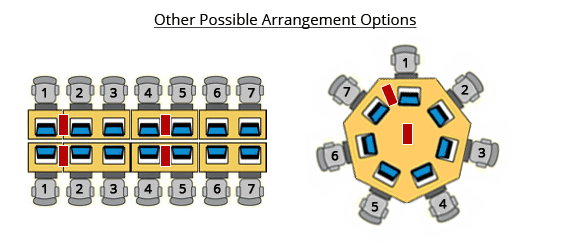
PC-Station systems can be configured in a wide variety of ways depending on the specific needs of your application. The following examples can be used to help identify the approximate cable lengths for your installation. The examples assume a center-to-center spacing of 1 meter between users (for side-by-side configurations) and a table height of 1 meter. Classrooms, office cubicles, Internet cafés and other environments have unique needs and furniture can also vary in size. Please use the following guidelines just as a starting point for your planning. It is important to carefully measure your specific environment to ensure the right cable length.
Remember you can also download and use iTimer, our FREE Internet Cafe Management Software.
Warranty
We warrant this hardware product against defects in materials and workmanship for a period of ONE (1) YEAR from the date of original retail purchase. If a defect exists, at its option Amest Santim General Business PLC will (1) repair the product at no charge, using new or refurbished replacement parts or (2) exchange the product with a product that is new or which has been manufactured from new or serviceable used parts and is at least functionally equivalent to the original product. A replacement product/part assumes the remaining warranty of the original product. When a product or part is exchanged, any replacement item becomes your property and the replaced item becomes Amest Santim General Business PLC’s property.
This Warranty applies only to hardware products sold by Amest Santim General Business PLC and that can be identified by different marks, names, stamps or logo affixed to them. The Warranty does not apply to similar hardware products sold by other vendors or any software, even if packaged or sold with Amest Santim General Business PLC’s hardware. Software distributed by Amest Santim General Business PLC is not covered under this Warranty. Amest Santim General Business PLC is not liable for any damage to or loss of any programs, data, or other information stored on any media. This warranty does not apply: (a) to damage caused by accident, abuse, misuse, misapplication, or non-Amest Santim General Business PLC products; (b) to damage caused by service; (c) to a product or a part that has been modified; or (d) if any Amest Santim General Business PLC or original manufacturer serial number has been removed or defaced.



why don’t you make the PC station software available on the website
Kume,
We provide the CD freely with the PC-Stations and if you lost yours, you can come to our address and get another copy.
Amest Santim
i need the installation software of PC station i lost which i have where can i get it?
Tewodros,
You can come and get another copy from our address. Remember to bring your receipt.
Realy i like pc station.
and i am inspirated to start internet cafe in Adama.
However i don’t have enough budget.What would you recommend me?
Dear Lemi,
There are various Micro Finance Institutions that will provide you with a small loan that will allow you to start an Internet Cafe business. The Internet Cafe business plan that we have prepared has some detail about this…
Please like our facebook page (http://www.facebook.com/myPCStation) so that you will know when the business plan become available for download on our website.
Thank you!
im so hapy to know that i can save 70perset but i do know how much it cost if i plan to open enternate cafe! For example if i want to open with 6 computer how much it cost?
Thanks alot
Perhaps you should download our “Internet Cafe Business Plan” to get an idea of the overall costs…
Here is the link
http://www.amestsantim.com/start-your-own-business/
i bought pc Station From your shop and now i have ordered the next one
Berhanu,
Thank you!
Please let us know if you need any support or anything else!
what is the maxim no of pc station that can go on a computer?
Tony,
You can have two sets of PC-Station on one computer meaning that you can have 6 additional users or 7 including the host computer.
hello,
I am using pc station for my Internet cafe. Here is the problem I am facing. I couldn’t open one browser be it Google chrome or Mozila in two monitors. If one user is already logged in then the other one can’t open that browser unless the previous one is closed. It says the program is already running, but not responding.” It really is giving me a hard time! pls help!
Adi,
The reason why the browser is giving you that message is because you’re running all you stations using the same windows user account. You should create separate user accounts for each of your stations and should login using those separate accounts on each of the station when they start.
Do this and you will no longer face that problem and every one will have their own separate everything including files on the desktop and My Documents folder.
Thanks!
Thank you very much! I did just like you told me and solved the problem! But Google chrome and Mozilla Firefox kept on crashing every moment! How can I solve it! Thank you in advance in anticipation of every help from you!
Chrome and Mozilla constantly crashing probably has nothing to do with with your PC-Station setup…perhaps it’s a corrupt installation or a virus…
i have a question when using the PC station Skype and other video call how to use the mike ??????
Abiy,
Well, since the PC-Station terminals do not have a mic connector, you can not use the headset’s mic, but you can plug in a USB webcam that has mic integrated with it and you can use that… so that you can bring the webcam near the station, you can use a USB extender cable. And you can use the headset’s speakers by plugging it in to the speaker port on the Terminal.
Hope this helps!
hello,
look My PC station was working correctly till yesterday. yesterday I formatted my computer and as such I installed the PC station software again. But it is not working and the extended computers says winlogon terminated and sometimes internal error. The window I am using is window xp SP 3. Please help!
You will find the answer in the appropriate section here:
http://www.amestsantim.com/troubleshooting/
i have Station:Stopped error haw can i fixe it plllllllllllllz!
Tigist,
The solution to your problem is provided on our “Troubleshooting” page, see below.
http://www.amestsantim.com/troubleshooting/
how to working by PC station webcam and air phones.
You can use webcams with PC-Station by using a USB webcam with integrated mic and by using a USB extender cable to “bring” one USB port to the terminal so that the webcam can be plugged into it! Finally, you plug in your ear phones in to the speaker port on the PC-Station terminal.
i have mws multipoint work station how can i use itimer. thank u 4ur help.
Temesgen,
iTimer was designed to work on Windows XP only and will not properly function on Windows MultiPoint Server.
u mentioned Software applications run simultaneously and independently on each virtual desktop but i cant run a browser simultaneously on each station suggest me if there is a way
The reason you’re not able to run the browser simultaneously is because you’re using the same user account on all stations. You should be logged in on each station with a different account. Please watch the installation video to see how that is done.
thank you for ur help it worked and i need another help why is that one of my station monitor is blurred i cant able to fix it. in addition how can i use timer software’s like easy cafe Tank you in advance for ur help
Fanuel,
The most probable cause for the blurriness of one of your monitors would be the network cable. Try re-crimping both ends of the cable and if that doesn’t work, replace the cable. Also check the VGA cable of your monitor.
Hope this helps!
My PC station is stopped displaying station starting i tried to uninstall and installing again and i disabled antivirus and turned of Windows fire wall but nothing still changes
Sounds like a virus problem, you might need to format and re-install windows xp.
i wan to start my own intrnt cafes out of addis using ur pc station could ugive me short explanation on how to implement all when i buy ur product and …
You can read our Internet Cafe Business Plan:
http://www.amestsantim.com/start-your-own-business/
I was trying to install NCX 2000 but the message winlogon is displayed on all the stations and I can’t use the pc station.
Can you help me fixing this? thank you!
The answer to your problem can be found on the troubleshooting page. Click on the following link and read under the section “PC-Station”
http://www.amestsantim.com/troubleshooting/
Hello dear 5 santims
i just bought all necessary equipments in order to get start my litle internet cafe, but then, the pc that i have bought to make the surver is dell 7010, and i have 2 pc station cards,while the 7010 has one slot for the card. So what is the possible method i have to use,and u recomand.
Thank you.
Your only option would be to add one more system to accommodate the second PC-Station card. Dell 760 is becoming available on the market and it has two PCI slots.
dear amest santium frequently i have got keyboard problem the keyboard of the pc station will suddenly stop i tried to cheek the cable but still not working what is the reason or if u have any support plz forward the comment ?
The problem is actually caused by Deep Freeze and the solution is to unfreeze the computer and reboot it a few times until all your keyboard and mice are working. Then you can freeze it again and the problem will not return.
dear amest santim
I am one of the users of your PC station service.but i have some problem with the color of the monitors.it is not like the normal color of the computer.is the problem with arrangement of cables?what type of color arrangement(cross over or straight through) can i use?
thank you very much
Yes, color problems on the monitors are mostly associated with the cables. The crimping of the cables must be done “straight through”, meaning both ends the same.
You can find the combination on the PC-Station page.
First you (Amest santim trading members) have to deserve a great thanks for innovating this kind of technology specially for our society and then what I am going to ask is: Now a days a PC net which is compatible with Windows 7 and supports a USB port is available. While I was visiting your website I can’t get any info about that So that would you like to say something about this how it operates.
Ibrahim,
We have a completely new device that can be used by Internet cafes that will allow you to do many things including use web cams. We will have the details available on our website shortly.
Thanks!
hallo first i used PC-station . one day i format my computer & install PC-station it dose not working ” you must set the correct date on your system for station to your probably. pleas change your system date to the correct value” what shall i do b/c i used the correct date
Well, that message is caused by an error on the installation CD. To bypass the error, you can start the installation by browsing the CD and going in to the PC-Station folder and running the file pcstn.exe
What a good job! I saw how you are committed to assist peoples!
Keep it up!
Thank you!
Hi
my PC station CD is not working/the setup is corrupted. Can i use other persons PC station CD,does it work on my PC? If not what can i do,other option rather than coming to your office,bse its far for me
Yes, if you can find any other PC-Station CD, you can use it!
hi when i intall the itimer server display this error msg “run time error ‘339’ component ‘mswinsck.ocx’ or one of its dependencies not correctly registered: a file is missing or invalid”how can fix this error ples!
Are you trying to install on Windows 7? If you are, that could be the reason.
Hello I’m Tilahun, i am using PC Station, i used this station for the purpose of Internet Cafe, but I can’t Share Internet browser application (i.e. if i opened Mozilla Firefox (any browser) in one station the rest of the station can’t be open) why this happened? can I share It?
The reason is because you’re using the same account for all stations. The issue has been clearly explained in our “Troubleshooting” section. Please refer to that.
To Dears
I have bought 6 pc stations and 6 keyboard and mouth of ps2. My plan was for internet cafe, but I want to change it to game for children. Will the pc station able to play what is installed at the mother PC? If yes does it have the capacity to play even huge capacity games?
No, PC-Station is not well suited for playing games as they require a lot of the processors time and also need high resolution. PC-Station supports only a maximum resolution of 1024 x 768.
Hello, I am from Kenya and I am interested in your PC-Stations for a starting a cyber cafe. how can I get your product here in Kenya. Please advise.
Thank you.
Joel Mutua
At the moment, we are not able to sell to you in Kenya. If you have friends travelling from Addis to Kenya, they can purchase it from us and bring it for you.
The mother PC is working well but the pc stations stops with xtenda station 1-stopped, station 2-stopped… I came to your troubleshooting section and uninstall the X300 graphics controller, but no change can be seen. Please try your best to solve the problem.
As you might have read in the troubleshooting section, the problem is caused either by your antivirus software blocking the PC-Station software or a virus infection. Either way, the easiest solution would be to format and re-install windows xp again.
i use Pc-station for my internet cafe but i cant manage the money account for the day i worked.how can you help me?
We’re not sure we’ve understood your question so we’ll attempt to answer it the best we can. You can view reports (daily, weekly, monthly and using any date range) from the iTimer Server, by first loging in and then accessing the reports menu.
can i use power geez on my clients?
Yes, you can, as long as the user accounts you’re using on the stations are administrator (not limited) type. Power Geez requires that the user be an administrator otherwise, it will not work.
Hi
I have been using PC station for about two years. I am living in remote area. My PC- Station software is affected by Virus. please can you tell me how can I access it easily?
Dear Elias,
Unfortunately, due to it’s large size, the PC-Station CD is not available online for download, you’ll have to collect it from our office.
which window should i use for pc station??
Windows XP Service Pack 3
i want to uninstall the pc station but i lost the password so what can i do???
Try booting in safe more and uninstalling it, if that doesn’t work, try using System Restore. Your last option would be to format the computer. Have you tried the default password 1234?
First of all I appreciate your work !!!!
I used 760 dell PC the operating system is win xp sp2…but When I try to use the Pc station terminals it doesn’t work( the main Pc works but it doesn’t display on the screen)
shortly
When I connect the pc station card the monitor doesn’t display the information on the screen
When I disconnect the card from the slot it works (displays the information)
..Is there any system setup with my 760 dell pc? Thanks
You need to update the BIOS of the computer first to the latest version. You can find this on the Dell website.
How many years can I use pc station on average?
There is no limit to how long you can use PC-Station. In fact, you can use PC-Station for much longer than you can use computers because its hardware does not get outdated. You can upgrade the host computer thereby upgrading all your stations…
1.can i use dell gx 745 for pc-station server? 2.every moment after installing the PCI card driver the OS is crashed and blue screen will comes??? 3.my friends told me that PC-station works only on Dell GX 620 pc is that true? tnx.
PC-Station is compatible with almost all Dell models such as 7010, 790, 780, 760, 620, 520, 270, 260 etc… the only models that are incompatible are 745 and 755.
Your problem seems to be software related, make sure you don’t have any antivirus software installed and also make sure you’re using a good copy of Windows XP when you’re formatting your computer.
I have Dell 760 computer installed with Window 7 OS. while installing PC Station software it didn’t accept /displays comparability problem/ is there any solution?
First of all, you need to change the OS to Windows XP SP3, then you also need to make sure your computer is running the latest BIOS. You can download the BIOS update file for your model from Dell’s website and update it.
hello!
I have Dell 620 model pc and can it support PC station?
Yes!
hey admin
I have PC station and used but in the men time it stops. and when i try to re install it it displays a message “the password was not allowed” and “this SW is hardware protected” do you have any idea pls??
You get the message “This software is hardware protected” when you are trying to install the software while the PCI card is not plugged in. Make sure you have plugged in the card and that it is properly seated and is not loose…
tnx admin !!
is there a situation where the PCI card may fail?? like power fluctuation??
Yes, that is a possibility. Bring the card to our office and we will check it and if it was indeed power related, we might be able to repair it for you.
trying to install the pc station but it keeps saying the software is hardware protected and cannot install, i need help asap!!!!
You need to make sure that the PCI card is properly inserted in to the computer that you’re trying to install the software on. If the software does not detect the card then it will not allow you to install it.
tnx it worked, but why does the antivirus(avast) detect itimer as a virus??
It’s a false positive. We believe it is because iTimer has communications over the network… but no need to worry, just use Microsoft Security Essentials, it’s free and quite good.
best
Dear amist santim how can i use pc sation on win7
Unfortunately, you simply can’t!
when i instal PC-station CD the procedure successful but when it initialized the computer not working properly, it ask wilongon terminated or internal error pleas what i can do?
Please read the PC-Station section on our troubleshooting page.
pls check ur troubleshooting link… it is reported unwanted software and not working!!!
We believe it was wrongly identified as harmful and we have reported the error to Google, hopefully, the mistake will be corrected shortly. In the meanwhile, you can click on the “Details” link and then “Visit the site” link to visit the page.
Thanks!
Hi,how r u?
firstly, i appreciate your work and polite support for societies as a whole.
I have seen your Amist santim internet cafe business plan which is published @2014G.c
What i want to ask is how the financial requirements for the hardware and software components are needed currently @ 2017 when compared with @2014?
i wait Your response,
i ask this question,b/c currently i want to open an internet cafe @2017!!!!
Dear Jemal,
We understand that the business plan we have produced in 2014 is now badly outdated but we do not feel that the Internet cafe business at the moment is feasible on its own and until we do, we will not be updating the plan.
We also no longer import and distribute PC-Stations, which were a major ingredient in making the plan a success.
Hope you understand.
I have bought a pc station device almost four years a go from you. and these device is working yet. but a week a go the software fails. I came to your office to have another, your staff member at Tefera Building 9th floor told me as you no longer sale it. Please can you help me hove another software and my computers stand again for students? \
Thanks!
Although we no longer sell PC-Station we still support existing customers and still provide the software CD for those who need it.